How to Screen Print T-Shirts at Home — Easy Step-by-Step Guide
Discover the magic of screen printing your own t-shirts right at home! This guide breaks down the process into simple steps, perfect for creating unique, personalized apparel for your family. From preparing your design to curing the ink, we cover everything you need to know to achieve professional-looking results. Get ready to unleash your creativity and transform plain t-shirts into wearable art!
Quick answer
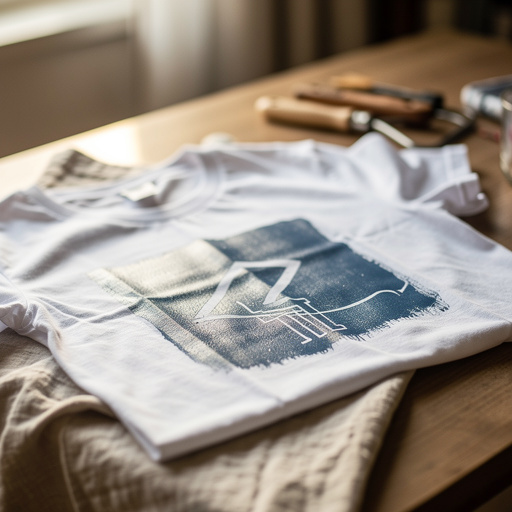
To screen print t-shirts at home, you need a screen, emulsion, ink, and a t-shirt, taking about 2-3 hours. Start by preparing your design and exposing it onto a screen coated with photo emulsion. This beginner-friendly activity has 10 core steps, expandable to 15-20 with detailed preparation and drying, and is perfect for families with kids aged 8+.
What you need
Shop on Amazon · As an Amazon Associate we earn from qualifying purchases. Links above are affiliate links — we may earn a commission at no extra cost to you.
Unleash your inner artist and transform ordinary t-shirts into personalized masterpieces with the rewarding craft of DIY screen printing! This accessible technique allows you to create unique designs, perfect for custom apparel, thoughtful gifts, or even starting a small business. Whether you're a seasoned crafter or a complete beginner, this guide will walk you through each step with clarity and ease. It's an ideal project for families looking for a creative outlet, offering a fun and engaging way to produce professional-looking prints that will be cherished for years to come.
On this page
Step-by-Step Instructions
- 1
Prepare your design: Draw or print your design onto transparency film or a clear plastic sheet using a black permanent marker. Ensure it's a solid black image with no grey areas or pixelation, as these will not block light effectively during exposure. For digital designs, print them in solid black on a laser printer for the best results.
- 2
Prepare the screen: Clean your screen printing frame thoroughly with rubbing alcohol to remove any dust or grease, which can interfere with emulsion adhesion. Once clean, tape off the edges of your screen printing frame with masking tape or packing tape, ensuring no gaps where emulsion could leak through. This creates a barrier and also protects your hands from the emulsion.
- 3
Mix the emulsion: In a dark room or under very low light, carefully follow the instructions on your photo emulsion kit to mix the sensitizer into the emulsion. Stir gently and slowly to avoid introducing air bubbles, as these can create pinholes in your stencil. Once mixed, the emulsion has a limited shelf life, so it's best to use it within a few hours.
- 4
Coat the screen: In a dark room or under low light, pour a small amount of the mixed emulsion onto the top edge of the screen. Using an emulsion scoop coater (or the edge of a piece of cardboard if you don't have one), spread the emulsion evenly across the screen with smooth, consistent strokes. Aim for a thin, even layer on both sides of the screen, then let it dry completely in a dark, dust-free area, which typically takes about 30-60 minutes depending on humidity and airflow.
- 5
Expose the screen: Once the emulsion is completely dry and you've ensured there are no dust specks, place your design (emulsion side down) onto the dried, coated screen. Secure it firmly with tape around the edges to prevent any movement. Expose the screen to a strong light source for 5-15 minutes, depending on the intensity of your light source. Sunlight is a powerful option, but a dedicated UV exposure unit or a strong incandescent lamp can also work.
- 6
Wash out the stencil: After exposure, take the screen to a sink or bucket and gently rinse it with water. The areas of the emulsion that were blocked from light by your design will wash away, creating your stencil. Use a soft scrub brush or sponge to gently encourage the emulsion to lift, but be careful not to damage the hardened emulsion around the design. The goal is to have clear openings where your ink will pass through.
- 7
Dry the screen: Allow the screen to dry completely after washing out the stencil. You can speed this up with a fan or by placing it in a warm, dry area. Ensure it is thoroughly dry before proceeding to the printing stage, as any residual moisture can affect ink adhesion and print quality.
- 8
Prepare the t-shirt: To ensure a clean print and prevent ink from bleeding through to the back of the t-shirt, place a piece of cardboard or a stiff plastic sheet inside the t-shirt. Smooth out the fabric over the cardboard, making sure there are no wrinkles or creases where you intend to print.
- 9
Position the screen: Carefully position the prepared screen onto the t-shirt where you want your design to appear. Ensure it is centered and straight before applying any ink. You can use a few pieces of tape to temporarily hold the screen in place if needed, but make sure the tape doesn't cover any part of your design area.
- 10
Apply the ink: Apply a generous line of water-based fabric ink to the top edge of your design on the screen, directly above the stencil opening. Don't be shy with the ink; you need enough to cover the design area completely for a good print.
- 11
Print the design: Hold the screen firmly in place with one hand to prevent it from shifting. With the other hand, use your squeegee at a 45-degree angle to pull the ink across the design in a smooth, even motion. Apply firm, consistent pressure throughout the stroke, ensuring the ink is pushed through the stencil openings. A single, confident pass is often best for beginners.
- 12
Lift the screen: Carefully lift the screen straight up from the t-shirt to reveal your freshly printed design. Avoid dragging the screen, as this can smudge the ink. Inspect the print for any imperfections or areas that may have missed ink coverage.
- 13
Cure the ink: Allow the ink to air dry for at least 24 hours. For a more durable and permanent print that can withstand washing, follow the ink manufacturer's instructions for heat curing. This typically involves ironing the print with a hot iron (without steam) for a few minutes or using a heat gun to achieve the recommended temperature. Proper curing is crucial for longevity.
- 14
Clean your screen: Immediately after printing, clean your screen thoroughly with water and a scrub brush or sponge to remove all excess ink. If you used emulsion that is not reclaimable, you can use a screen opener to help remove ink residue. For reusable emulsion, follow the kit's instructions for reclaiming the screen so it can be reused for future projects.
- 15
Inspect and repeat: Examine your printed t-shirt for any issues. If you're happy with the result, you can proceed to print more shirts. If you encounter any problems, refer to the troubleshooting tips to identify and correct the issue for your next print.
Tips & Troubleshooting
- 1Troubleshooting: If ink bleeds or appears fuzzy, your screen might not have been fully dried after washing out the stencil, or there might be small gaps in your emulsion coating that allowed ink to seep through. Ensure thorough drying and a smooth, consistent emulsion application to prevent these issues.
- 2Variations: Experiment with different ink colors, t-shirt colors, and even layering multiple stencils for complex designs. You can also try different types of fabric inks, such as metallic or glow-in-the-dark options, to add unique effects to your prints.
- 3Storage: Store your prepared screens flat in a cool, dry place, away from direct sunlight, to prevent the emulsion from degrading. Clean them thoroughly after each use to prolong their life and ensure they are ready for your next creative endeavor.
- 4Safety: Always wear gloves when handling emulsion and ink, as they can be messy and potentially irritating to the skin. Work in a well-ventilated area, especially when curing the ink with heat, to avoid inhaling fumes.
- 5Design Simplicity: For your first few attempts, start with simple, bold designs that have clear lines and solid shapes. This will make the stencil creation and printing process much easier and increase your chances of success.
- 6Emulsion Consistency: Achieving a consistent emulsion coating is key. Practice using your scoop coater or squeegee to get an even layer. Too thick and it might not expose properly; too thin and it might be too fragile.
- 7Exposure Time: Exposure time is critical and depends heavily on your light source. It's a good idea to do a test exposure with a small piece of emulsion and your design to dial in the perfect time for your setup.
- 8Ink Viscosity: Water-based inks can vary in thickness. If your ink is too thick, it can be difficult to push through the screen. You can often thin it slightly with a screen printing medium or a small amount of water, but be careful not to add too much, as it can affect the ink's durability.
Related Activities You Might Enjoy
Frequently Asked Questions
Can I really screen print t-shirts at home?
Absolutely! With a few basic supplies and this step-by-step guide, you can create professional-looking screen prints on t-shirts right in your own home. It's a fun and rewarding DIY project that allows for immense creative freedom. While it requires a bit of patience and practice, the results are well worth the effort. You'll be able to produce unique, personalized apparel that rivals what you might find in specialty shops, all from the comfort of your own workspace.
What is the easiest way to screen print at home?
The easiest way to start screen printing at home is by using a pre-made stencil or a simple design drawn on transparency film, combined with the photo emulsion method described in this guide. This approach is quite accessible for beginners as it doesn't require complex equipment like vinyl cutters or specialized printers. The key is to have a solid black design on your transparency, which effectively blocks light during the exposure process, leading to a clean stencil for printing.
How long does it take to screen print a t-shirt?
The actual printing process of pulling the ink across the screen and lifting it is quite quick, often taking just a few minutes per shirt. However, the preparation and drying times for the emulsion and ink add significantly to the overall duration. You can expect to spend around 2-3 hours from start to finish, including the time needed for coating and drying the emulsion, exposing the screen, washing out the stencil, and allowing the ink to cure. This timeline can vary based on your setup and environmental conditions.
What kind of ink do I need for screen printing t-shirts?
For screen printing on t-shirts and other textiles, you need water-based fabric ink specifically designed for screen printing on garments. This type of ink is formulated to adhere to fabric, remain flexible after curing, and withstand washing and wear. Avoid using general craft inks or paints, as they may not be durable enough for apparel and could crack or wash out over time. Always check the product description to ensure the ink is suitable for fabric and screen printing.
What are the essential supplies for a beginner screen printer?
For a beginner looking to screen print t-shirts at home, the essential supplies include a screen printing frame, photo emulsion kit (emulsion and sensitizer), a squeegee, water-based fabric ink, blank t-shirts, transparency film or clear plastic sheets, and a black permanent marker. You'll also need tape for securing the screen, a light source for exposure, and materials for cleaning like paper towels and a scrub brush. A piece of cardboard to place inside the t-shirt is also crucial for preventing ink bleed-through.
How do I ensure my design is properly exposed onto the screen?
Proper exposure is crucial for a successful stencil. Your design on transparency film must be solid black to effectively block light. When exposing, ensure the transparency is in direct contact with the emulsion-coated screen. The exposure time will vary depending on the strength of your light source; it's often a process of experimentation to find the sweet spot. Overexposure can make the stencil too hard to wash out, while underexposure can lead to the stencil washing away completely or ink bleeding during printing.
What Next?
Congratulations on mastering the art of DIY screen printing! You've now unlocked a versatile skill that opens up a world of creative possibilities. Don't stop at t-shirts; consider printing on tote bags, hoodies, or even posters. Experiment with different ink colors, textures, and layering techniques to create even more intricate designs. Once your creations are cured, display them proudly or gift them to friends and family. Store your screens properly in a cool, dry place, ensuring they are thoroughly cleaned after each use to maximize their lifespan for countless future printing adventures.
Free: 10 Paper Crafts Anyone Can Make in 5 Minutes
Get our beginner guide + new craft ideas weekly.
No spam. Unsubscribe anytime.
Did you complete this activity?
Related